
5.1 KiB
Algolia Search
NexT provides Algolia search plugin for index your hexo website content. To use this feature, make sure that the version of NexT you are using is after the v5.1.0 release. What you should note here is that only turn on enable of algolia_search in next/_config.yml cannot let you use the algolia search correctly, you need to install corresponding Hexo Algolia plugin to seach your website with Algolia. Follow the steps described below to complete the installation of Algolia search.
-
Register at Algolia, you can log in directly using GitHub or Google Account. Upon Customer’s initial sign-up for an Account, Customer will have a free, fourteen (14) day evaluation period (the “Evaluation Period”) for the Algolia Services commencing on the Effective Date, subject to the limitations on Algolia’s website. After that, Algolia offers a free, branded version for up to 10k records and 100k operations per month.
-
If a tutorial pops up, you can skip it. Go straight to create an
Indexwhich will be used later.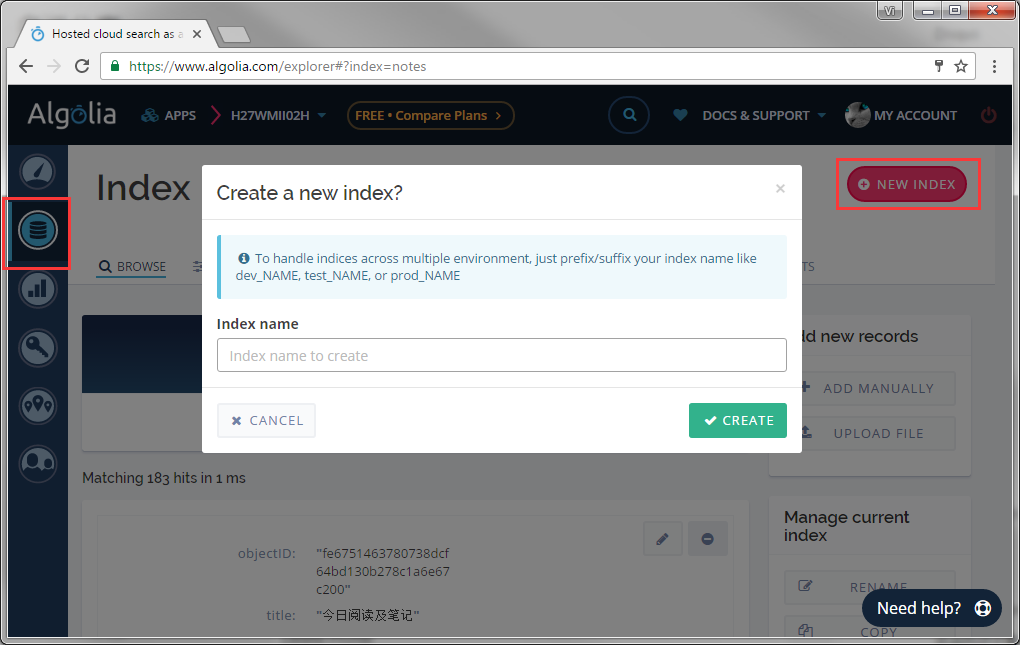
-
Algolia requires users to upload their search index data either manually or via provided APIs. Install and configure Hexo Algolia in your Hexo directory. This plugin will index your site and upload selected data to Algolia.
$ cd hexo $ npm install --save hexo-algolia -
Go to the
API Keyspage and find your credentials. You will need theApplication IDand theSearch-only API keyin the following sections. TheAdmin API keyneed to keep confidential. Never store your Admin API Key as apiKey in the_config.ymlfile: it would give full control of your Algolia index to others and you don't want to face the consequences.
-
In the
API Keyspage, click theALL API KEYSand theeditoption in the created APIKEY to activate a pop-up box where you can setup authorizations and restrictions with a great level of precision. CheckAdd records,Delete records,List indices,Delete indexfeatures in ACL permissions that will be allowed for the given API key. And then click theUpdatebutton.

-
In your site's
_config.yml, add the following configuration and replace theapplicationID&apiKey&indexNamewith corresponding fields obtained at Algolia.algolia: applicationID: 'Application ID' apiKey: 'Search-only API key' indexName: 'indexName' chunkSize: 5000 -
Run the following command to upload index data, keep a weather eye out the output of the command.
$ export HEXO_ALGOLIA_INDEXING_KEY=Search-Only API key # Use Git Bash
# set HEXO_ALGOLIA_INDEXING_KEY=Search-Only API key # Use Windows command line
$ hexo clean
$ hexo algolia
-
Change dir to NexT directory, and install module to
source/libdirectory.$ cd themes/next $ git clone https://github.com/theme-next/theme-next-algolia-instant-search source/lib/algolia-instant-searchIf you want to use the CDN instead of clone this repo, then need to set vendors in NexT
_config.ymlfile:vendors: ... # Internal version: 1 # https://www.algolia.com algolia_instant_js: https://cdn.jsdelivr.net/npm/instantsearch.js@2.4.1/dist/instantsearch.js algolia_instant_css: https://cdn.jsdelivr.net/npm/instantsearch.js@2.4.1/dist/instantsearch.min.css ... -
In
next/_config.yml, turn onenableofalgolia_search. At the same time, you need to turn off other search plugins like Local Search. You can also adjust the text inlabelsaccording to your needs.# Algolia Search algolia_search: enable: true hits: per_page: 10 labels: input_placeholder: Search for Posts hits_empty: "We didn't find any results for the search: ${query}" hits_stats: "${hits} results found in ${time} ms"
Known Issues
-
The latest version of the Hexo-Algolia plugin removes the content indexing feature, given Algolia's free account limitation.
-
The Hexo-Algoliasearch plugin provides content indexing functionality, but requires the replacement of keywords in the NEXT theme. The same problem exists with
Record Too Bigfor Algolia's free account.- Replace all
applicationIDinsource/js/algolia-search.jswithappId - Replace all
applicationIDinlayout/_partials/head/head.swigwithappId
- Replace all